Notion Core Life Planner
Notion Core Life Planner
Couldn't load pickup availability
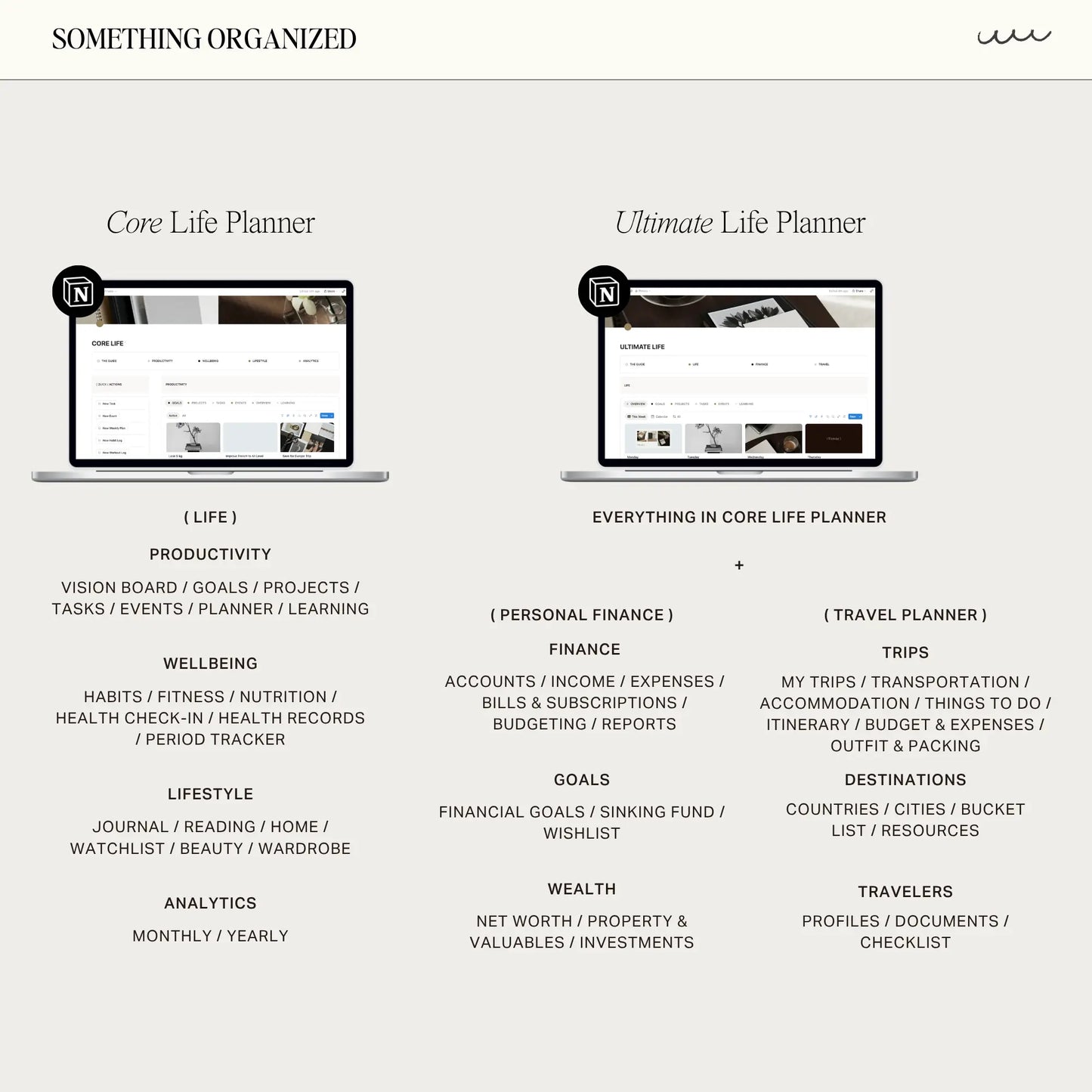
The Core Life Planner is a thoughtfully designed life management system created to bring more clarity, structure, and intention into your everyday life.
Designed inside Notion, this planner helps you organize the areas of life that matter most — from productivity and routines to wellbeing, personal growth, and lifestyle organization — all within one connected and refined workspace.
Plan your goals, manage projects and tasks, build routines, track habits, organize your learning, prioritize your wellbeing, and create systems that support the life you want to live.
Fully customizable, beginner-friendly, and compatible with the free Notion plan.
Are you a startup or founder?
Apply now to get 3 months FREE on the Notion Business plan with Notion AI
FEATURES
- A complete life management system for productivity, wellbeing, and lifestyle organization
- Goal and project management with connected tasks and seamless progress tracking
- Intelligent task management with priorities, recurring tasks, and time tracking
- Daily and weekly planning with a unified view of tasks, habits, events, and deadlines
- Advanced habit tracking with streaks, customizable routines, and monthly and yearly insights
- Wellness check-ins for mood, hydration, sleep, stress, and overall wellbeing
- Fitness and nutrition tracking for workouts, meal planning, and personal progress
- A dedicated learning hub for courses, study sessions, and growth tracking
- Guided journaling templates for daily reflection, gratitude, and weekly reviews
- Reading tracker with progress monitoring and personalized insights
- Watchlist for films and series with ratings, reviews, and viewing history
- Home, beauty, and wardrobe organization, including product expiry reminders
- Health records and medication tracking in one connected space
- Comprehensive insights across productivity, wellbeing, and lifestyle habits
- Custom icons, covers, and thoughtfully designed layouts throughout
- Step-by-step video tutorial included
WHAT’S INSIDE
HOMEPAGE
PRODUCTIVITY
(01) Vision Board
(02) Life Goals
(03) Projects
(04) Tasks
(05) Events
(06) Planner
(07) Learning
WELLBEING
(08) Habits
(09) Fitness
(10) Nutrition
(11) Health Check-In
(12) Health Records
(13) Period Tracker
LIFESTYLE
(14) Journal
(15) Reading
(16) Watchlist
(17) Home
(18) Beauty
(19) Wardrobe
THE GUIDE
(20) Full Video Tutorial
NOTES
Digital Product & Refund Policy
This is a digital download. No physical product will be shipped.
Access to the template is provided instantly after purchase.
All sales of digital products are final and non-returnable. Refunds and exchanges are not offered, as access cannot be removed once the template has been delivered.
If you experience any issues, please feel free to contact me directly—I’m always happy to assist and typically respond within 24 hours.
License & Usage
This template and any included files or widgets are licensed for personal or internal team use only.
Redistribution, resale, or sharing the files—whether original or modified—with clients or external users is strictly prohibited. Your purchase grants a non-transferable license for use within your own Notion workspace only.
All files included are for personal use only. Unauthorized redistribution or resale may result in appropriate action to protect intellectual property rights.
Language & Currency
This template is designed and labeled in English. You’re welcome to change page titles, labels, and text inside Notion to your preferred language; however, please note that some formulas rely on specific property names, and changing those may affect how the template functions.
All amounts in the template are shown in USD, but currency symbols and formatting can be adjusted inside Notion to match your own preference (such as EUR, GBP, or others). If you’re unsure how to do this, I’m happy to help guide you.
Notion Plan Requirements
All templates work on the free Notion plan. Please note that Notion limits free accounts to one visible chart at a time. Templates with multiple charts still function fully, but only one chart can be visible simultaneously. This limitation comes from Notion, not the template.
- Lifetime Access
- Easy Navigation
- YouTube Tutorials
How to Use
How to Use
1. Access Your Template
After purchase, a PDF file containing the template link will be sent to your email. Download the file and click the provided link to access the template.
2. Duplicate to Your Workspace
- Once on the template page, click the "Start with this template" or "Duplicate" button in the top-right corner.
Tips for Duplicating:
- Use a desktop or laptop for the best experience, as some users may experience issues duplicating on iPad, tablet, or phone.
- Ensure you’ve selected the correct workspace when duplicating. Avoid selecting "Private" as it might cause issues with the template displaying correctly. If problems persist, try again with a stable internet connection.
3. Start Customizing and Organizing
- Your own editable version is now ready!
- Customize the template to fit your needs and start organizing effortlessly.
FAQs
FAQs
-
Can I use this on a free Notion account?
Yes, all templates are fully compatible with Notion’s free plan. However, please note that the free plan limits you to only one chart per workspace. To use charts, select the one chart you’d like to keep and delete the others, including any chart views filtered by month. You can easily adjust the chart to display data for the current month or by year.
-
Can I modify or change the formula?
While you're welcome to customize any pages within the dashboard, we kindly advise exercising caution when modifying formulas, as this may inadvertently affect other interconnected pages. If you're uncertain about making changes to formulas, we recommend seeking assistance to avoid unintended consequences.
-
Can this template be used in subsequent years?
This template is structured for annual use. While you can extend it by adding additional years, please note that at the end of each year, the template will be updated. Feel free to re-duplicate the template to ensure you have the most current version available.
-
Can I resell your Notion template?
No, all files included in the template are for PERSONAL use only. Redistribution, resale, or reproduction of the template, in whole or in part, is strictly prohibited. Violation of this policy may result in legal action to protect intellectual property rights and pursue damages for unauthorized distribution.
Policy & Terms
Policy & Terms
- This is a digital download. No physical product will be shipped to you.
- All files included in the template are for PERSONAL use only. Redistribution, resale, or reproduction of the template, in whole or in part, is strictly prohibited. Violation of this policy may result in legal action to protect intellectual property rights and pursue damages for unauthorized distribution.
- Due to the nature of digital products, all sales are final and non-returnable. We do not offer refunds or exchanges. However, if you encounter any issues with your purchase, please don’t hesitate to contact us. We are committed to resolving any problems and will respond to your query within 24 hours.
Share